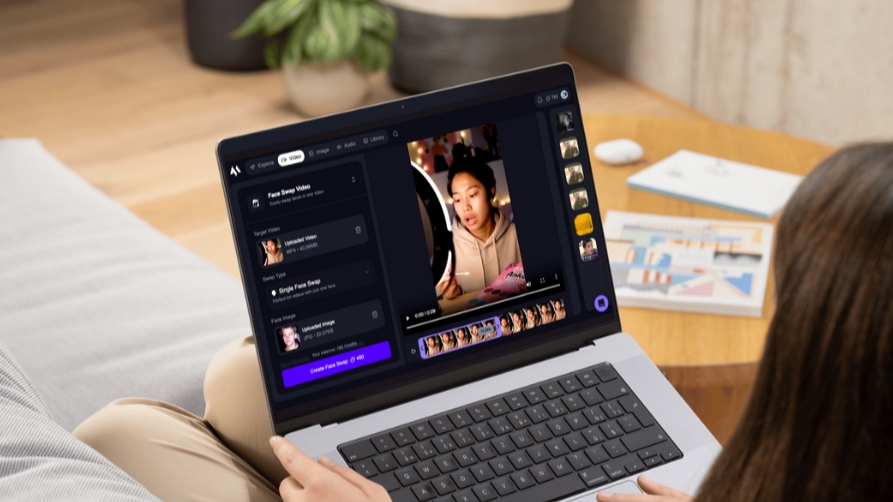
Face swapping in a single photo is easy. Face swapping in a moving video, where the new face has to track head turns, match changing light, and stay believable frame after frame, is a completely different problem. As of June 2026, a handful of tools have actually solved that problem well enough to fool people at normal viewing distance, while most others still produce the flickering, mask-like results that gave early deepfakes a bad reputation.
I spent two weeks running the same set of test clips, talking-head footage, fast movement, and changing light, through the AI face swap video tools creators, marketers, and developers are using this year. This guide covers what actually held up, what fell short, and which platform takes the top spot. I guarantee at least one of these tools will fit what you are trying to do.
Best AI Video Face Swap Tools at a Glance
| Tool | Best For | Free Tier | Commercial Use | Platforms |
| Magic Hour | All-around quality and full creative suite | Yes, no signup, 3 swaps/day | Yes, on paid plans | Web, mobile, API |
| Reface | Viral templates and quick social clips | Yes, watermarked | No, on free tier | Mobile, web |
| DeepSwap | Custom video uploads, 4K output | Limited trial | Yes, on paid plans | Web |
| Vidnoz | Marketing teams, batch and multi-face | Limited daily credits | Yes, on paid plans | Web |
| FaceMagic | Short-form social clips under 30 seconds | Yes, generous for short clips | Limited on free tier | Mobile, web |
| HeyGen | Business and marketing video production | Trial only | Yes, on paid plans | Web |
| Runway | Editing-suite integration | One-time trial credits | Yes, on paid plans | Web |
| FaceFusion | Local, open-source, privacy-first | Yes, fully free | Yes, self-managed | Desktop (local GPU) |
| DeepFaceLab | Maximum quality, full technical control | Yes, fully free | Yes, self-managed | Desktop (local GPU) |
| CapCut | Casual, mobile-first editing | Yes | Limited | Web, mobile, desktop |
Magic Hour
Magic Hour is the tool I kept coming back to throughout testing, and for good reason. It pairs genuinely free, no-signup AI face swap video with the kind of realism that avoids the uncanny valley look most competitors still struggle with.
The free version runs right in the browser. Upload a target video and a face photo, and the tool handles head movement, angle changes, and lighting shifts automatically, without manual tracking or masking. According to independent testing from The AI Journal, Magic Hour has earned recognition as one of the most realistic face swapping tools currently available, with reviewers noting it avoids the flickering and mismatched lighting that plague lower-quality competitors.
Pros:
- No signup required to try, with 3 free video face swaps per day and paid-plan credits that never expire
- Best-in-class face swap, lip sync, and talking photo tools built into the same account
- Handles motion and angle changes automatically, cutting down on manual cleanup
- Full API parity, so the same workflow runs in the browser or in a production pipeline
- Access to six frontier AI models spanning video, image, and audio
- Click-to-create templates and one-click chained workflows, generate, then upscale, then export
- No concurrency cap on lower tiers, with parallel generations available even on entry plans
- Weekly feature releases keep the toolset expanding rather than stagnating
- Mobile and desktop optimized with consistent output quality
- Founder-level support that responds quickly instead of routing through a ticket system
- Trusted by teams at Meta, the NBA, L’Oreal, Puma, and Shopify
Cons:
- Free tier clips are capped at 10 seconds and 576p resolution, with a watermark on output
- Heavy commercial users will want a paid plan for 4K, longer clips, and watermark-free results
If you are looking for a platform that delivers realistic swaps without a complicated editing workflow, this is hard to beat. Pricing starts with a Free plan requiring no credit card. Creator runs $15 per month, or $10 per month billed annually, with full API access and three concurrent generations. Pro costs $39 per month for higher resolution exports and five concurrent generations. Business runs $99 per month for unlimited concurrent generations and 4K output, where most agencies and high-volume teams land. Try the AI face swap video tool directly in your browser before deciding which tier fits your workload.
Reface
Reface has been the dominant mobile face swap app for several years, and it holds that position through a constantly updated library of pre-optimized video templates rather than raw technical superiority on custom footage.
Pros:
- Massive, regularly updated library of movie scenes, music videos, and meme templates
- Results on template clips look polished since each one is pre-optimized for face tracking
- Extremely fast, often producing results in under 10 seconds
Cons:
- Custom video uploads are far less reliable than template clips, especially during fast movement
- Free tier output carries a watermark and does not include commercial rights
- Less suited to professional or client-facing work than casual social content
Reface earns its place for quick, fun social content rather than polished production work. If your goal is jumping on a trend before it fades, it remains one of the fastest ways to do it.
DeepSwap
DeepSwap has built a reputation specifically around custom video uploads, an area where many template-first competitors struggle.
Pros:
- Strong, consistent performance on uploaded footage rather than just pre-built templates
- Supports 4K output and multi-face swapping in a single video
- Handles standard talking-head content with decent lighting adaptation
Cons:
- Action sequences and extreme angles still introduce visible artifacts
- Free tier functions more as a limited trial than an ongoing option
- Interface leans more technical than some casual-friendly competitors
DeepSwap is a solid choice when your footage is your own and needs to hold up across a full video rather than relying on a pre-built template.
Vidnoz
Vidnoz bundles face swapping into a broader AI video creation platform, which makes it useful for marketing teams that need more than a single feature.
Pros:
- Batch processing handles multiple videos at once, useful for production at scale
- Multi-person face swap supports more than 10 people in a single scene
- Integrates with the same platform’s text-to-speech and video template tools
Cons:
- Face swap quality on its own sits in the mid-range compared to specialized tools
- Free tier functions closer to a limited demo than daily-use access
- Best value comes from using the broader platform, not face swap alone
If you need face swapping alongside AI avatars, voice generation, and templated marketing video in one place, Vidnoz’s bundled approach avoids juggling separate tools.
FaceMagic
FaceMagic focuses specifically on short-form video under 30 seconds, optimizing for the exact format most social creators actually need.
Pros:
- Strong results on short clips, close to top-tier quality for that specific use case
- More creative control over blending and style than most mobile-first competitors
- Generous free tier for short clips specifically
Cons:
- Longer videos require a subscription and are not the tool’s strength
- Less suited to professional or long-form production work
- Narrower scope than full-suite competitors
For creators making TikTok-style or Reels-style face swap content specifically, FaceMagic’s narrow focus is genuinely an advantage rather than a limitation.
HeyGen
HeyGen targets business and marketing teams that need face swap as one part of a larger video production workflow rather than a standalone creative tool.
Pros:
- Built specifically for marketing and business video production
- Fits naturally alongside other AI video generation features on the same platform
- Useful for replacing on-camera talent in existing promotional content
Cons:
- Trial-only access before requiring a paid plan
- Higher pricing tiers aimed at teams rather than individual creators
- Less focused on raw face swap realism than dedicated specialists
HeyGen makes sense for a business workflow that already needs broader AI video production, with face swap as a useful added capability rather than the main draw.
Runway
Runway folds face manipulation into a much larger professional editing suite, which suits editors who want this capability inside a tool they already use for other work.
Pros:
- Integrates well into existing professional video editing workflows
- Frequently among the first platforms to add new generative video capabilities
- Useful for teams already working inside Runway for broader VFX needs
Cons:
- Not a face-swap specialist, so dedicated tools often produce cleaner results
- Credit-based pricing adds up quickly for high-volume face swap use specifically
- Steeper learning curve than browser-first, single-purpose tools
Runway is worth considering if face swapping is one feature among many in a broader editing pipeline rather than the entire job.
FaceFusion
FaceFusion is the strongest open-source option for anyone who wants full control and zero ongoing cost, at the price of needing real technical setup.
Pros:
- Fully free with no recurring cost
- Runs locally, which keeps footage off external servers entirely
- Detailed facial mapping and a wide range of specialized models included
Cons:
- Requires local GPU power and technical comfort with setup
- No hosted, browser-based version for casual users
- Slower to produce results than cloud-based tools optimized for speed
FaceFusion rewards technical users who want maximum privacy and control without paying a subscription. It is not the right starting point for someone who wants results in the next five minutes.
DeepFaceLab
DeepFaceLab remains the open-source tool behind much of the highest-quality face swap content seen online, and it produces results that genuinely surpass most commercial alternatives.
Pros:
- Highest achievable quality of any tool in this category
- Full technical control over every stage of the swap pipeline
- Free to use, with an active community supporting development
Cons:
- Steep learning curve that assumes real technical background
- Requires a powerful GPU and hours of training time per face pair
- Far from a quick, casual workflow compared to browser-based competitors
DeepFaceLab is the right tool only if quality matters more than time, and you are comfortable with a genuinely technical setup process.
CapCut
CapCut rounds out the list as the most casual, mobile-first option, useful for creators who already edit inside the app and want a face swap filter without switching tools.
Pros:
- Already familiar to most short-form creators
- Face swap filters sit inside a full editing timeline
- Generous free tier for casual, lower-stakes use
Cons:
- Face swap quality and control lag noticeably behind dedicated specialist tools
- Limited customization compared to purpose-built face swap platforms
- Best suited to casual content rather than professional production
If you are already editing in CapCut and just want a quick face swap filter without leaving the app, it covers the basics.
How I Chose These Tools
I tested each platform on the same set of source clips, talking-head footage, fast movement, and varied lighting conditions, and scored results on realism, motion handling, pricing transparency, and breadth of supporting features. Wherever a free or trial tier existed, I used it directly rather than relying on marketing claims. I checked every price against each platform’s current pricing page at the time of testing, since plans in this category shift often. I also weighed how each platform handles consent and data privacy, since that has become a genuinely important part of evaluating any face swap tool in 2026.
The Market Landscape and Emerging Trends
The face swap category has matured fast. The global deepfake and face swap market reached a valuation in the billions in 2025, driven largely by entertainment and marketing use cases, and quality has improved enough that the best tools now genuinely fool viewers at normal distances rather than producing an obvious mask effect. Regulation has caught up just as quickly. The TAKE IT DOWN Act became enforceable in the United States in May 2026, requiring platforms to remove nonconsensual intimate deepfake content upon notification, and the EU AI Act now classifies unconsented face swaps as high-risk, with disclosure requirements for any AI-generated content used within the EU. Reputable platforms like Magic Hour have responded with consent reminders, watermarking, and content moderation built directly into the product, while open-source tools like FaceFusion and DeepFaceLab place that responsibility entirely on the user. Expect platforms across the category to keep adding clearer consent and labeling features as enforcement increases.
Final Takeaway
For most creators, marketers, and developers, Magic Hour remains the strongest overall pick because it delivers genuinely realistic results without a complicated editing workflow, backed by a full creative suite and pricing that scales sensibly. If your priority is jumping on viral trends fast, Reface’s template library is hard to match. If you are working with your own custom footage at scale, DeepSwap or Vidnoz are worth testing. And if quality matters more than convenience and you have the technical background for it, FaceFusion or DeepFaceLab will get you the closest to professional deepfake quality without any subscription cost. Test a few of these against your own footage before settling on one, and always confirm you have consent from anyone whose face appears in the final result.
FAQ
Is AI face swap video free to use in 2026?
Yes. Magic Hour offers a genuinely free, no-signup video face swap tool with daily limits, and several other platforms, including Reface and FaceMagic, offer limited free or watermarked access as well.
Which face swap tool produces the most realistic video results?
Independent testing has consistently ranked Magic Hour among the most realistic options available, particularly for avoiding the flickering and lighting mismatches common in lower-quality tools. Open-source DeepFaceLab can match or exceed that quality with enough technical setup and GPU time.
Is it legal to use AI face swap tools?
Using face swap on your own face, or with explicit consent from the person whose face appears, is legal in most places. Creating nonconsensual intimate deepfakes is illegal under U.S. federal law, including the TAKE IT DOWN Act, and most platform terms of service strictly prohibit it.
Can I use AI face swap video for commercial projects?
It depends on the platform and plan. Magic Hour, DeepSwap, Vidnoz, and HeyGen include commercial usage rights on paid plans. Reface’s free tier does not include commercial rights, and open-source tools like FaceFusion place licensing responsibility entirely on the user.
Do AI face swap tools work well on fast-moving or action footage?
Most tools, including several covered here, still show visible artifacts on fast movement or extreme angles. Tools that automatically handle motion and lighting changes, rather than relying on a single static face mapping, tend to perform noticeably better on this kind of footage.
About the Author